
Articles Select Dropdown is a Joomla 6 module inspired from avalynx https://www.cssscript.com/bootstrap-dropdown-avalynx-select/ that displays Joomla articles inside a modern, user-friendly Bootstrap 5 enhanced dropdown.
It is developed to help website visitors quickly access selected articles or articles from one or more selected categories, without the need to display a long list of links on the page.
Articles Select Dropdown module is to improve content navigation while keeping the page layout clean and organized. Instead of showing multiple article links in a long list, the module presents them inside a dropdown field.
Functionality
The module can display articles in two different ways. The administrator can either manually select specific articles or choose one or more Joomla categories and let the module automatically load articles from those categories.
When the visitor selects an article from the dropdown, the module redirects them to the selected article page. The article can be opened either in the same browser window or in a new window, depending on the module settings.
The dropdown is enhanced with the AvalynxSelect script, which transforms the standard select field into a Bootstrap 5 dropdown component. This provides a cleaner interface, optional live search, scrollable item lists, and a better overall user experience.
Settings
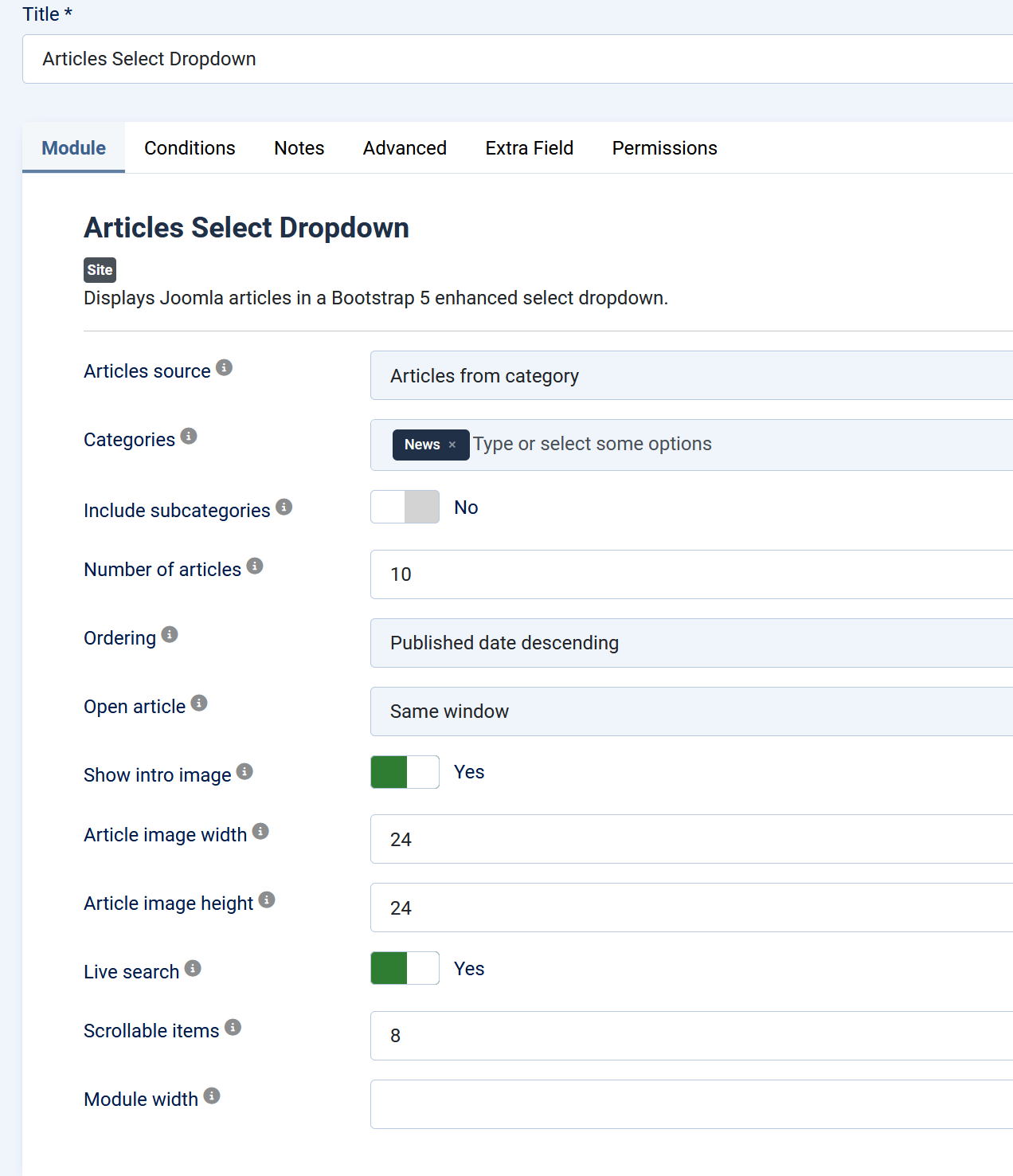
Articles source
Choose whether the dropdown will display manually selected articles or articles from a selected category.
Available options:
- Articles from category
Displays articles automatically from one or more selected Joomla categories. - Select articles
Displays only the articles manually selected in the module settings.
Selected articles
Choose articles to show from dropdown.
This setting is used when the article source is set to Selected articles. Manually select the specific articles that should be displayed in the dropdown.
Categories
Choose one or more categories whose articles will appear in the dropdown.
This setting is used when the article source is set to Articles from category. The module will automatically load articles from the selected categories.
Include subcategories
Also include articles from child categories of the selected category.
When enabled, the module will display articles not only from the selected categories, but also from their subcategories.
Number of articles
Maximum number of articles to display when using category mode. Use 0 for no limit.
This setting controls how many articles are loaded by the module when the source is set to Articles from category.
Ordering
Choose the article ordering used in the dropdown.
Available ordering options:
- Published date descending
Displays the newest published articles first. - Published date ascending
Displays the oldest published articles first. - Created date descending
Displays the newest created articles first. - Created date ascending
Displays the oldest created articles first. - Title ascending
Displays articles alphabetically by title, from A to Z. - Title descending
Displays articles alphabetically by title, from Z to A. - Article ordering ascending
Displays articles based on Joomla article ordering in ascending order. - Article ordering descending
Displays articles based on Joomla article ordering in descending order.
Open article
Choose articles url to open in the same window or in a new window.
Available options:
- Same window
The selected article opens in the current browser window. - New window
The selected article opens in a new browser window or tab.
Show intro image
Display the Joomla article intro image next to the article title in the dropdown list.
When enabled, the module displays the intro image of each article inside the dropdown, together with the article title.
Article image width
Optional width of the article intro image inside the dropdown, in pixels. Leave empty or 0 to use the default 42px.
This setting controls the width of the article image displayed in each dropdown item.
Article image height
Optional height of the article intro image inside the dropdown, in pixels. Leave empty or 0 to use the default 42px.
This setting controls the height of the article image displayed in each dropdown item.
Live search
Enable search inside the enhanced dropdown.
When enabled, users can search through the available articles directly inside the dropdown.